
Merging four URLs into one paginated PDF
How continuous page numbering works across documents, and why gluing PDFs afterwards breaks font subsets.
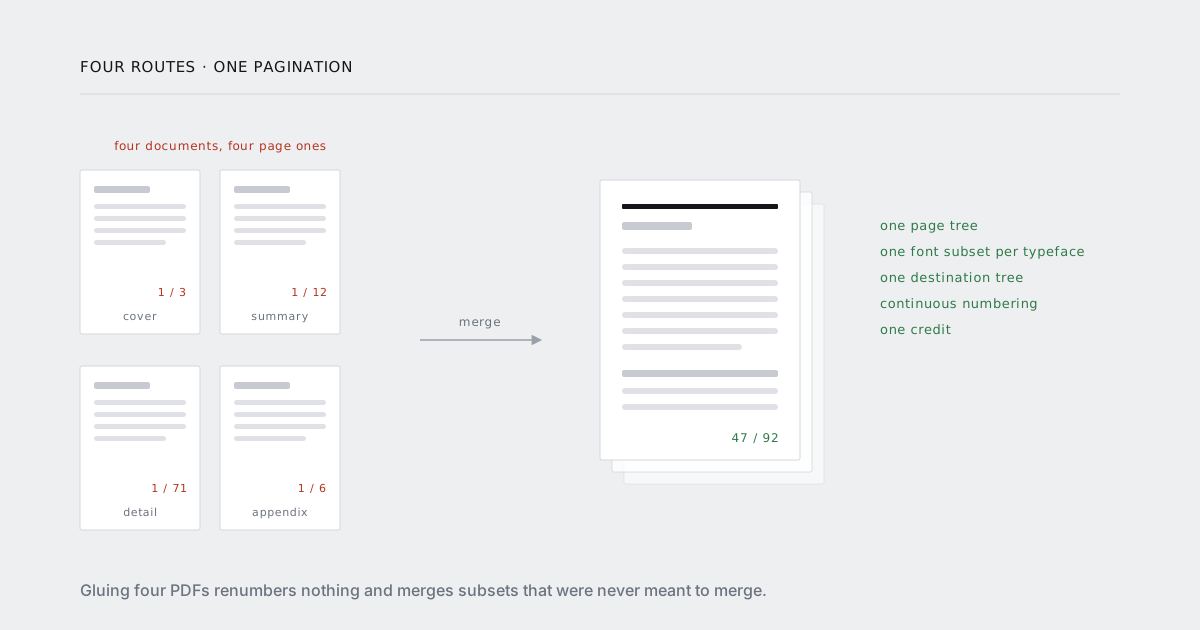
A report is rarely one route. The cover comes from a template, the summary from a cached aggregate, the detail from a query that takes four seconds, and the appendix from whatever legal last approved. Four URLs, four owners, four caching strategies.
The obvious move is to render four PDFs and glue them together. It works on the first try, which is the problem — the failures show up later, in files you have already sent.
What concatenation actually does
A PDF is an object graph with a page tree hanging off it. Concatenation copies the pages from document B into document A's tree and renumbers the object ids so nothing collides. That is genuinely all most libraries do, and for a lot of jobs it is enough.
It is not enough here, for four reasons.
Page numbers are baked in
Each of the four documents was numbered independently. Your reader sees 1 / 3, then 1 / 12, then 1 / 71, then 1 / 6. The footer text is drawn content — glyphs positioned in a content stream — not a field you can update.
So you renumber afterwards, which means either:
- Overlay a new footer on every page and hope it lands somewhere the old one is not. Now you have two page numbers on each page, and you are back to blanking the old one with a white rectangle, which is exactly as fragile as it sounds.
- Rasterise and redraw. Your text layer is gone. Nobody can select the invoice number, search for a clause, or extract the table.
Both require knowing the total page count before you can draw of 92, so you render everything, count, and then do a second pass over the bytes.
Font subsets do not merge
This is the one that produces a bug report rather than an ugly PDF.
When a renderer embeds a font, it embeds a subset: only the glyphs the document actually used. The subset is renumbered, so glyph id 4 in your cover's copy of Inter is whatever character happened to be fourth in that document. In the appendix's copy of Inter, glyph id 4 is something else entirely. Both are tagged with a random prefix — ABCDEF+Inter, QRSTUV+Inter — precisely so nothing assumes they are interchangeable.
A merger that respects those tags keeps all four subsets. Your file carries four partial copies of the same typeface and is larger than it needs to be. Annoying, correct.
A merger that "optimises" by deduplicating on the base font name maps one document's text to another document's glyph table. The result is text that renders as the wrong characters — and because the shared prefix of any Latin subset is mostly the same common letters, it usually looks fine until you hit an accented character, a currency symbol or a name. The cover is perfect. The client's name in the appendix is Ştefănescu rendered as three plausible-looking wrong glyphs.
Nobody catches this in review, because reviewers read the cover.
Internal links point at the wrong pages
A table of contents in a rendered PDF resolves to named destinations inside its own document. Merge four documents and the destinations still point where they always did — page 3 of the source, which is now page 47, or page 3 of the merged file, which is a different section entirely. Outlines, bookmarks and any <a href="#anchor"> all have the same problem.
A good merger rewrites the destination tree. Most do not, and the failure is silent: the link still works, it just goes somewhere wrong.
Everything else that is per-document
Page labels, tagged-PDF structure trees, metadata, form fields, page sizes. If the appendix was rendered Letter and the rest A4, the merged file has two page sizes and prints badly on both.
The alternative: fragment once
Instead of laying out four documents and stitching the results, load the four sources into a single paginated layout and fragment that. Pagination is continuous because there is only one pagination.
const job = await client.render({
  merge: [
    reportUrl(id, "cover"),
    reportUrl(id, "summary"),
    reportUrl(id, "detail"),
    reportUrl(id, "appendix")
  ],
  format: "A4",
  margin: { top: "18mm", bottom: "22mm" },
  wait_for: "document.charts-ready",
  footer_html: "<div>{page} / {total}</div>",
  table_of_contents: true,
  async: true,
  callback_url: "https://acme.com/hooks/report",
  store: true
});

// { id: "job_9fK2mQ", status: "queued" }
Four sources, one document, one font subset per typeface, one destination tree, one credit.
How {total} is known before the last page is laid out
It is not, and that is fine.
The sources are loaded in order into one paginated context. Fragmentation runs across the whole thing, so a table that starts in detail and runs long simply continues onto the next page the way it would in a single document. When the last fragment is placed, the page count is known.
Headers and footers are then drawn in a second pass over the finished page tree. That pass is cheap because layout is already done — nothing reflows, nothing moves, and the {page} and {total} tokens are substituted with numbers that are final by construction.
This is the structural difference from concatenation. There, the second pass has to modify already-rendered content streams and hope. Here, the second pass is the first time footers are drawn at all.
Section boundaries
By default the sources flow into each other, so the summary can start halfway down the cover's last page. Usually you want a fresh page:
/* in each section's own stylesheet */
body > .section-root { break-before: page; }
Or, if you would rather not touch four stylesheets, per-source:
merge: [
  { url: reportUrl(id, "cover") },
  { url: reportUrl(id, "summary"),  break_before: "page" },
  { url: reportUrl(id, "detail"),   break_before: "page" },
  { url: reportUrl(id, "appendix"), break_before: "recto" }
]
recto starts the section on a right-hand page, inserting a blank if needed — the convention for anything destined for double-sided print.
Restarting numbering in the appendix
Appendices are usually numbered separately: A-1, A-2, rather than continuing from 71.
merge: [
  { url: reportUrl(id, "cover"),   page_label: "none" },
  { url: reportUrl(id, "summary"), page_label: { style: "decimal", start: 1 } },
  { url: reportUrl(id, "detail") },
  { url: reportUrl(id, "appendix"), page_label: { style: "decimal", prefix: "A-", start: 1 } }
]
Page labels are a real PDF feature, not a footer trick — the reader's page box shows A-3 while the underlying page index stays 74. Front matter with roman numerals works the same way.
The table of contents
table_of_contents: true collects headings across all four sources and resolves destinations after pagination, so entries point at final page numbers and the PDF outline matches.
Two things you control:
- Which headings count. By default
h1andh2. Give the elements stable ids if you also want them as link targets. - Where it goes. The TOC is inserted at the first
<nav data-toc>it finds, in whichever source contains it — usually the cover. If there is none, it goes after the first source.
What is still your problem
Each source must render standalone. If detail depends on JavaScript state set by summary, it will not work. They are loaded independently; only the layout is shared.
Pick one page size. Mixed sizes are legal and nobody wants them.
One font stack. Four sources with four different body fonts means four embedded typefaces, deliberately rather than accidentally. Deliberate is fine. Check the file size afterwards.
Headers and footers are global. They are drawn in the page margin across the whole document. If the appendix genuinely needs a different footer, it is a different document — render it separately and link to it.
Wait for the slowest source. wait_for applies to each source as it loads. A charts-ready event that only detail emits will hang the others. Emit it everywhere, or make it a per-source setting.
When concatenation is still right
Appending a static PDF you did not render. Terms and conditions supplied by legal as a finished file, a signed annexe, a scanned certificate. You are not renumbering those and you should not be re-laying them out.
Put them last, accept that their numbering is their own, and reference them from the TOC as an annexe rather than a section. If you need them numbered with the rest, render them from HTML like everything else — which is usually less work than defending a page-numbering scheme to an auditor.
The queueing behaviour for merged jobs — retries, priority lanes, webhook delivery — is under async and scale. The end-to-end version for reports is on the reports use case.