
Why your PDF page breaks moved after a Chrome update
Print layout is not frozen. Three real regressions — a table header that jumped to page two, a total block that split, a footer that overlapped body text — what changed in the engine each time, and why version pinning is the only honest fix for documents you already archived.
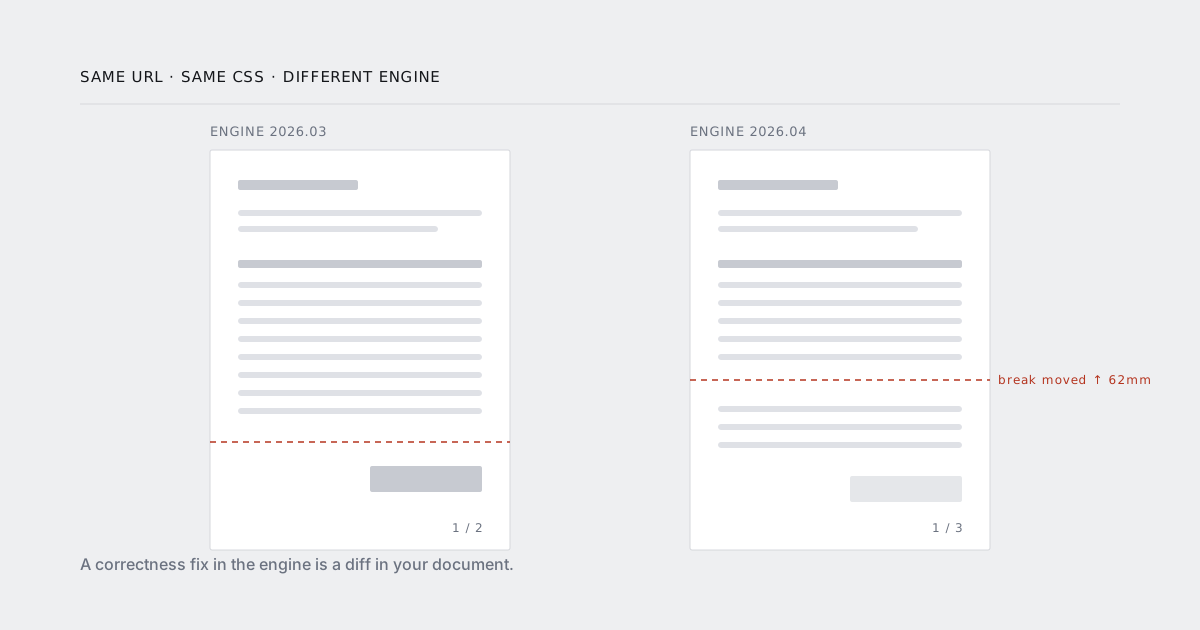
The ticket is always the same shape.
Invoice 10428 used to be two pages. Today it is three. Nothing was deployed.
Nothing was deployed by you. Something was deployed by us, or by Chromium, or by whoever maintains the last dependency in the chain that decides where a page ends. Page breaks are the part of your document that nobody owns and everybody assumes is stable.
They are not stable. Here is what actually moves, why, and what to do about the documents you have already sent to customers.
Print layout is not frozen
Screen layout in Chromium has been essentially settled for years. Paginated layout has not. Fragmentation — the code that decides how a box is cut in half when it meets the bottom of a page — is a smaller, younger, and much less exercised part of the engine. Tables, floats, multi-column blocks and nested break-inside: avoid containers all interact inside it, and each of those interactions has been rewritten more than once.
Most of those rewrites are fixes. A table that used to lose its border on the second page stops losing it. A float that used to overlap the footer stops overlapping. Every one of those fixes is also a change in where the break falls, which means every one of them is a regression for somebody who had already archived the old output.
That is the whole problem in one sentence: a correctness fix in the engine is a diff in your document.
Regression one: the table header that jumped to page two
A line-item table with <thead> repeats its header on every page it spans. That behaviour depends on the table itself fragmenting properly rather than being treated as one atomic box.
In an engine version where the table fragmented but the header group did not repeat, we saw invoices whose page two opened with a bare row of numbers — no Description, no Qty, no Unit price. Support tickets described it as "the second page looks like a fragment of something else". It was.
The trigger was narrower than it sounds. The table only misbehaved when a position: sticky was left on the header row from the screen stylesheet. Sticky positioning is meaningless in print, but it was enough to move the header out of the normal fragmentation path.
/* screen only. it does nothing useful in print and it breaks repeat. */
@media screen {
  thead th { position: sticky; top: 0; }
}
The fix in your stylesheet is one media query. The fix in the engine changed the page count of documents that were already fine.
Regression two: the total block that split
break-inside: avoid is a request, not a guarantee. The spec is explicit: if the box cannot fit in the remaining space and cannot fit on a page of its own, the engine has to break it anyway. An avoid on a box taller than the page area is not a stronger avoid. It is a no-op.
The invoice total block that split across two pages was 38mm tall inside a page area of 261mm, so that was not the reason. The reason was nesting. The block looked like this:
<section class="summary">          <!-- break-inside: avoid -->
  <table class="totals">           <!-- break-inside: avoid -->
    <tr>…</tr>
  </table>
  <div class="payment-terms">…</div>
</section>
The engine honoured the innermost avoid and ignored the outer one, so the totals table stayed intact and the payment terms went to the next page on their own. Then the engine was changed to propagate avoid outward, and the whole section moved to page two together — correct, and a different page count for every invoice with a long enough item list.
Two rules survive engine churn:
- Put
break-inside: avoidon exactly one wrapper, the one you actually care about, and not on its children. - Keep that wrapper comfortably shorter than the page area. If it can approach a full page,
avoidwill be dropped and you will not be told.
Regression three: the footer that overlapped body text
Header and footer templates are not part of your document. They are laid out in their own small document, with their own font size, and painted into the page margin. Your CSS does not reach them and their height does not push your content.
So a footer needs room reserved for it in the page margin, and the reservation is manual:
const pdf = await client.render({
  url: signedInvoiceUrl(invoice.id),
  format: "A4",
  margin: { top: "18mm", bottom: "18mm" },
  footer_html: "<div>{page} / {total}</div>"
});
That works until the footer grows. Add a second line — a legal mention, a VAT number, a "generated on" date — and it is now taller than 18mm. It does not push anything. It paints over the last line of your table.
The engine change here was subtler than the previous two: the default line height inside the footer document moved by a fraction of a millimetre. Documents with 18mm of bottom margin and a two-line footer had roughly nothing to spare, so a fraction of a millimetre was the difference between a clean page and an overlap.
Measure the footer, then give it a margin with slack:
- one line → 15mm is fine
- two lines → 22mm
- a footer with a logo → measure it, add 6mm, stop guessing
How to find out which one you have
Page count is the cheapest signal you own, and almost nobody records it.
Render the same fixture against two engine versions and diff the count first. If the count moved, the break moved, and you can go looking. If the count is identical, diff the text layer before you diff pixels — pixel diffs on antialiased text are noise.
for v in 2026.03 2026.04; do
  curl -s -X POST https://urltodoc.com/api/render \
    -H "x-api-key: $URLTODOC_KEY" \
    -d url="$FIXTURE_URL" -d engine_version="$v" -d format=A4 \
    -o "out-$v.pdf"
  echo "$v: $(pdfinfo "out-$v.pdf" | awk '/^Pages/ {print $2}') pages"
done

pdftotext -layout out-2026.03.pdf - > a.txt
pdftotext -layout out-2026.04.pdf - > b.txt
diff -u a.txt b.txt
Three fixtures cover most of it: an invoice with one line item, one with twelve, one with sixty. The sixty-item fixture is where fragmentation actually happens, and it is the one people forget to write.
Run that in CI on every engine bump. The failure message you want is "fixture invoice-60 went from 4 pages to 5", delivered before a customer writes it for you.
Pinning, and the argument against it
Pin the engine version per project:
const pdf = await client.render({
  url: signedInvoiceUrl(invoice.id),
  engine_version: "2026.04",
  format: "A4"
});
The argument against pinning is real and you should hear it. A pinned engine is a frozen browser. It stops receiving upstream fixes, and eventually your stylesheet uses something it does not implement. Pinning forever is how you end up where wkhtmltopdf users ended up: a document pipeline running on a rendering engine nobody has touched in a decade.
So pin, but treat the pin as a version you own and promote:
- Default to the current version for anything disposable — previews, thumbnails, exports the user will regenerate anyway.
- Pin the version for anything you store and might have to defend.
- On every engine release, run the fixtures against it, look at page counts, and promote the pin deliberately.
- Record the promotion date. When an old document does not match a new render, that date is the answer.
Unpinned is not "always current". Unpinned means the layout of your legal documents is decided by whatever shipped on a Tuesday.
The documents you already archived
This is the part that matters more than the CSS.
Do not re-render an archived document. Not to add a logo, not to fix a typo in the footer, not because your storage migration made it convenient. The moment you re-render, you have a second artefact that differs from the one your customer received, and you have no way to prove which is which.
Archive the bytes. Store the SHA-256 next to the row. Store the engine version in the metadata too, because in four years the only useful answer to "why does this not reproduce" is a version number you wrote down at the time.
await db.invoices.update(invoice.id, {
  pdf_url:     pdf.url,
  pdf_sha256:  pdf.checksum,
  pdf_engine:  pdf.engine_version
});
If you genuinely have to reproduce an old document — a dispute, an audit, a regulator — pin to the recorded version and render again. That is the only path that produces the same bytes, and it only works if you wrote the version down.
The short version
- Page breaks move because fragmentation is still being fixed. That is not a bug you can wait out.
- One
break-inside: avoid, on one wrapper, kept well under a page tall. - No
position: stickyin print styles. - Page margin ≥ footer height, with slack.
- Fixtures at 1, 12 and 60 line items, page count asserted in CI.
- Pin the engine for stored documents, promote the pin on purpose, record it in the row.
- Never re-render something you already sent.
If you want the mechanics of the pin itself — how versions are promoted, how long old ones stay available — that is in the security and retention options. If you are still on your own Chromium and deciding whether this is your problem to keep, the Puppeteer comparison is the honest version of that trade.