
The five ways a headless render silently produces a blank page
Fonts, lazy images, animation frames, print media queries — and the one that is always your own auth redirect.
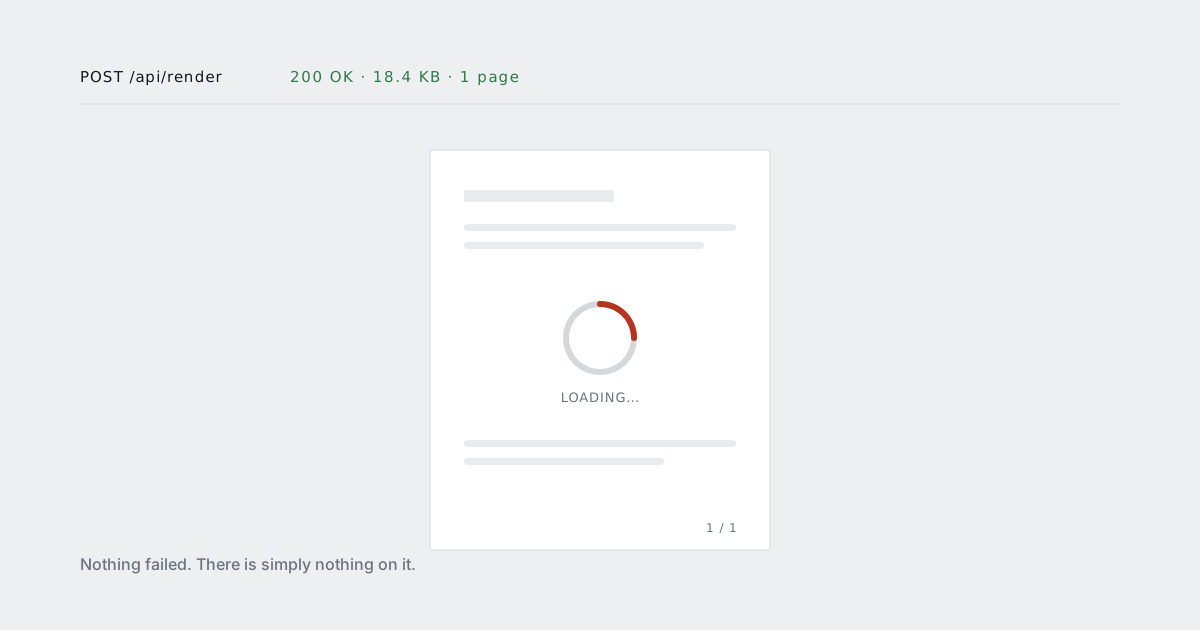
A render that fails is easy. You get an error, you log it, you retry.
A render that succeeds and returns an empty page is the expensive one. Status 200, a valid PDF, a plausible file size, and nothing on it. It goes into your storage bucket, gets attached to an email, and surfaces three weeks later as "the report you sent me is blank".
There are five reasons this happens. One of them is yours far more often than the other four combined.
1. Your own auth redirect
Start here, because this is the answer roughly half the time.
The renderer is not your browser. It has no session, no cookie, no logged-in user. It requests /reports/q2, your middleware sees an anonymous request, and returns a 302 to /login. The renderer follows the redirect and faithfully renders your login screen — or, if your login screen is a client-side app that redirects again, a white shell.
Nothing about that is an error. Every hop returned a valid response.
Two things make it visible immediately. Check where you actually ended up, and assert on something that only exists on the real page:
const pdf = await client.render({
  url: signedReportUrl(report.id),
  wait_for: "#report-root[data-ready='true']"
});

if (!pdf.final_url.startsWith(reportBaseUrl)) {
  throw new Error(`redirected to ${pdf.final_url}`);
}
The durable fix is not to send the renderer through your login at all. Sign a one-time URL, scoped to one document, valid for a couple of minutes. We wrote up the four approaches and where each one goes wrong in rendering behind a login.
2. Fonts that are still blocking
font-display: block — the default in most browsers for a font with no font-display declared — hides text while the font loads. On screen that is a flash. In a render it is a decision: if the capture happens during the block period, the text is not slow, it is absent.
You get a PDF with correct layout, correct spacing, correct table borders, and no glyphs. People describe this one as "blank" even though technically it is not.
Wait for the fonts, not for a timer:
document.fonts.ready.then(() => {
  document.documentElement.dataset.fontsReady = "true";
});
await client.render({ url, wait_for: "html[data-fonts-ready]" });
And self-host. A render that depends on a third-party font CDN is a render that depends on someone else's uptime, at the exact moment you are generating a customer's invoice.
The related failure — the font loads, but the glyphs your customer's name needs are not in the subset — is different and worth its own read: why your brand font disappears inside a container.
3. Lazy images that never enter the viewport
loading="lazy" and every IntersectionObserver-based image loader make the same assumption: the user will scroll. Nothing scrolls during a render. Everything below the first viewport stays a placeholder, and if your page is mostly imagery, the document is empty from page two onwards.
Print stylesheets do not help. There is no CSS that turns lazy loading off.
The fix is to know you are being rendered and behave differently. A query parameter is enough:
@php($render = request()->boolean('render'))

<img src="{{ $chart->url }}"
     loading="{{ $render ? 'eager' : 'lazy' }}"
     decoding="{{ $render ? 'sync' : 'async' }}">
Then render ?render=1. Same page, same template, no second codebase — which is the whole point of rendering the page you already have.
4. Animation frames that have not finished
Every charting library animates by default. Bars grow, lines draw, slices sweep. The animation is why the chart looks good on a dashboard and why it is empty in your PDF: the render captured at frame zero, when every bar had height 0.
A canvas at frame zero is not blank in the file-format sense. It is a real image of nothing.
Turn animation off when rendering, and say when you are done:
const chart = new Chart(ctx, {
  options: { animation: isRenderMode ? false : { duration: 400 } }
});

Promise.all(charts.map(c => c.rendered))
  .then(() => document.dispatchEvent(new Event("charts-ready")));
await client.render({ url, wait_for: "document.charts-ready" });
Do not replace this with delay: 3000. A fixed delay is a bet that your slowest chart is faster than three seconds on the worst day of the month, and month-end is exactly when it will not be.
5. A print stylesheet that hides your app
The quiet one. Somebody wrote a print stylesheet years ago, for a page that no longer exists:
@media print {
  #app > *  { display: none; }
  .print-only { display: block; }
}
.print-only was a server-rendered block that got refactored away in 2024. Nobody noticed, because nobody prints from the browser. The renderer emulates print media, obeys the rule, and hides everything.
The variants are all the same shape: visibility: hidden on body with a .print-root that is now empty, a @page { size: A4 } next to a container with a fixed pixel height, a modal overlay with position: fixed painting white over the content because fixed elements land on the first page.
Audit the print stylesheet whenever you start rendering a page you did not write. Grep for display: none inside @media print and check that every selector still matches something.
Making blank fail loudly
Each of the five has its own fix, but they share one property: the render returns success. So add a check that does not care which of the five it was.
Extracted text length is a good enough proxy for most documents:
const pdf = await client.render({ url, extract_text: true });

if (pdf.text.trim().length < 200) {
  throw new RenderEmptyError(pdf.job_id, pdf.final_url);
}
Tune the threshold per document type — an invoice has a few hundred characters, a 90-page report has tens of thousands, a rendered social card has almost none and should be checked by pixel variance instead.
Then keep the failed job id. A render you can inspect afterwards is worth more than a stack trace, and "which of the five was it" takes about a minute once you can look at the output.
The order to check them in
- Where did the render actually end up? (Auth. It is auth.)
- Is there layout but no text? (Fonts.)
- Is text present but images missing? (Lazy loading.)
- Are charts present but empty? (Animation frames.)
- Is the page genuinely empty? (Print stylesheet.)
Five minutes, in that order, resolves nearly all of them. The remaining ones are usually a page that took longer than your timeout — which is a different post, and a good reason to go async.