
Why your brand font disappears inside a container
Font caches, missing subsets, and the reason a Japanese company name prints as empty boxes.
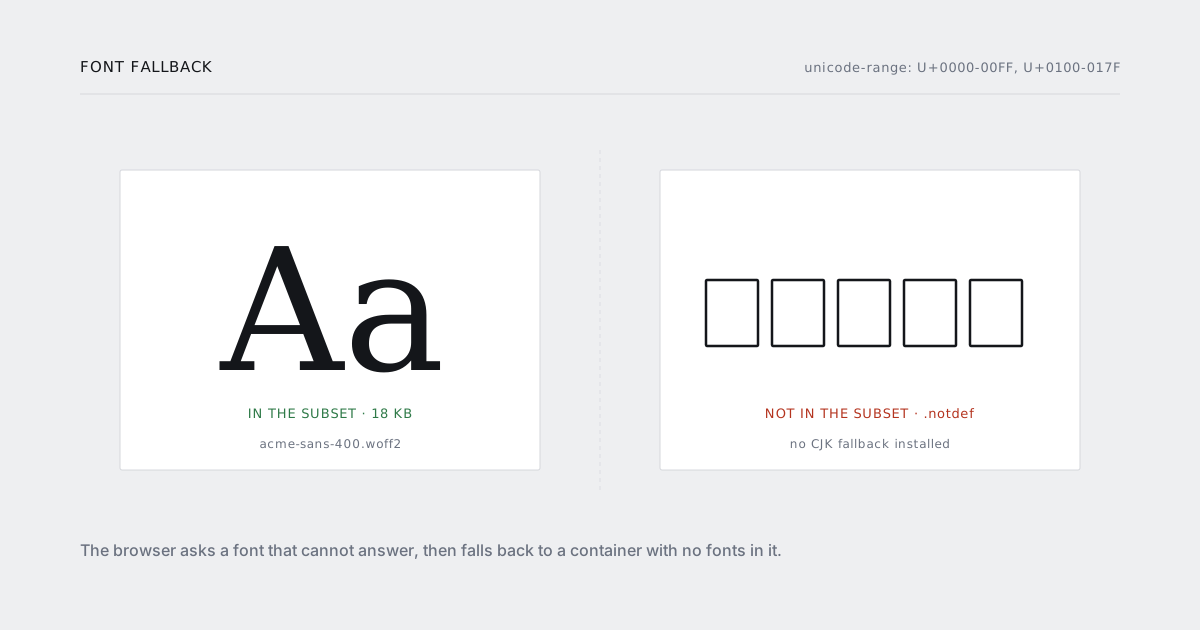
The invoice looks right on your machine and wrong in production. Or it looks right for eleven months and then a customer in Osaka replies with a screenshot of their company name rendered as five empty rectangles.
Fonts fail differently inside a container than they do in a browser, because a container usually has no fonts at all. Here are the five causes, in the order you should check them.
1. The image has no fonts
A slim base image ships with no system fonts. Not a reduced set — none. fontconfig is asked for a sans-serif, finds nothing, and the renderer draws whatever it can, which is often nothing.
docker run --rm your-image fc-list | wc -l
# 0
If that prints 0, stop reading and fix this first. Everything below assumes there is a fallback to fall back to.
RUN apt-get update && apt-get install -y --no-install-recommends \
      fonts-liberation \
      fonts-noto-core \
      fonts-noto-cjk \
      fonts-noto-color-emoji \
 && fc-cache -f \
 && rm -rf /var/lib/apt/lists/*
Four packages, a few hundred megabytes, and the difference between a document and a grid of boxes.
2. The font is fetched over the network at render time
@import url("https://fonts.googleapis.com/…") works on your laptop because your laptop has internet, DNS and no content security policy worth the name.
The render container may have none of those. Even where it does, you have made every invoice depend on a third party being up at the moment you generate it — and a font that arrives 200ms late arrives after the capture.
Self-host, same origin, woff2:
@font-face {
  font-family: "Acme Sans";
  src: url("/fonts/acme-sans-400.woff2") format("woff2");
  font-weight: 400;
  font-display: block;
}
font-display: block is the right choice for a render target, even though it is the wrong choice on screen. You would rather the renderer wait than capture invisible text.
3. The font cache is built on first use
fontconfig builds its cache the first time it is asked. On a cold container, the first render races that build and can lose — which is why the symptom is "the first PDF after a deploy is wrong and every one after it is fine".
Build the cache at image build time, not at request time. That is the fc-cache -f in the Dockerfile above. Verify it landed:
docker run --rm your-image fc-list :lang=ja | head -3
4. The subset does not contain the glyphs
This is the Japanese-company-name one, and it is the most common cause once the image has fonts.
Your build subsets the brand font down to what your site needs — Latin-1 plus Latin Extended-A, a few hundred glyphs, 18KB instead of 300KB. Sensible. Then an invoice needs 株式会社, the browser looks in Acme Sans, does not find those code points, walks the fallback stack, and draws .notdef for each one. .notdef is, in most fonts, an empty box. Five characters, five boxes, one email from your customer.
Two changes:
@font-face {
  font-family: "Acme Sans";
  src: url("/fonts/acme-sans-400.woff2") format("woff2");
  font-weight: 400;
  font-display: block;
  unicode-range: U+0000-00FF, U+0100-017F;   /* say what is actually in here */
}

body {
  font-family: "Acme Sans", "Noto Sans CJK JP", "Noto Sans", sans-serif;
}
unicode-range tells the browser which code points the subset covers, so it skips straight to the fallback instead of asking a font that cannot answer. And the fallback has to be a font that is actually installed in the container — which is what step 1 was for.
The result is a Japanese name set in Noto rather than in your brand font. It will not match the rest of the line perfectly. It will be readable, which is the entire requirement.
5. Weights you never declared
You declare 400 and 700, your stylesheet uses 600 somewhere, and the browser synthesises it — smearing the 400 outlines into a fake semibold. In a PDF this looks slightly muddy, in a way people describe as "the font looks off" without being able to say why.
Declare every weight you use, or stop using the ones you have not declared:
grep -rEo 'font-weight:\s*[0-9]+' resources/css | sort -u
Same for italics. A synthesised oblique is a sheared roman, and it looks like one.
Checking it before a customer does
Add a font canary to the page you render — a hidden element containing one glyph from every range you claim to support — and assert on it:
await document.fonts.ready;

const ok = document.fonts.check('400 10pt "Acme Sans"')
        && document.fonts.check('700 10pt "Acme Sans"');

document.documentElement.dataset.fontsReady = ok ? "true" : "false";
const pdf = await client.render({ url, wait_for: "html[data-fonts-ready='true']" });
And keep one fixture whose customer name is deliberately outside Latin-1. Not as a test of internationalisation — as a test of your fallback stack. It is the cheapest way to find this class of bug, and it costs one row in a seed file.
One thing that is not technical
Check your font licence before you install it in a rendering container. A lot of brand fonts are licensed for web use — served to browsers, counted in pageviews — and server-side document generation is a separate grant. It is rarely expensive and it is awkward to discover during an acquisition.
The checklist
fc-list | wc -lis not zero in the container.- Fonts self-hosted, same origin,
woff2. fc-cache -fat image build time.unicode-rangedeclared on every subset.- A CJK fallback installed and in the stack.
- Every weight you use declared explicitly.
font-display: block, and wait ondocument.fonts.ready.- One fixture with a non-Latin name.
If text is missing rather than wrong, the cause may not be fonts at all — the other four ways a render comes back empty covers the rest.