
Rendering behind a login, four ways
Signed one-time URLs, cookie pass-through, service tokens, basic auth — and when each is a bad idea.
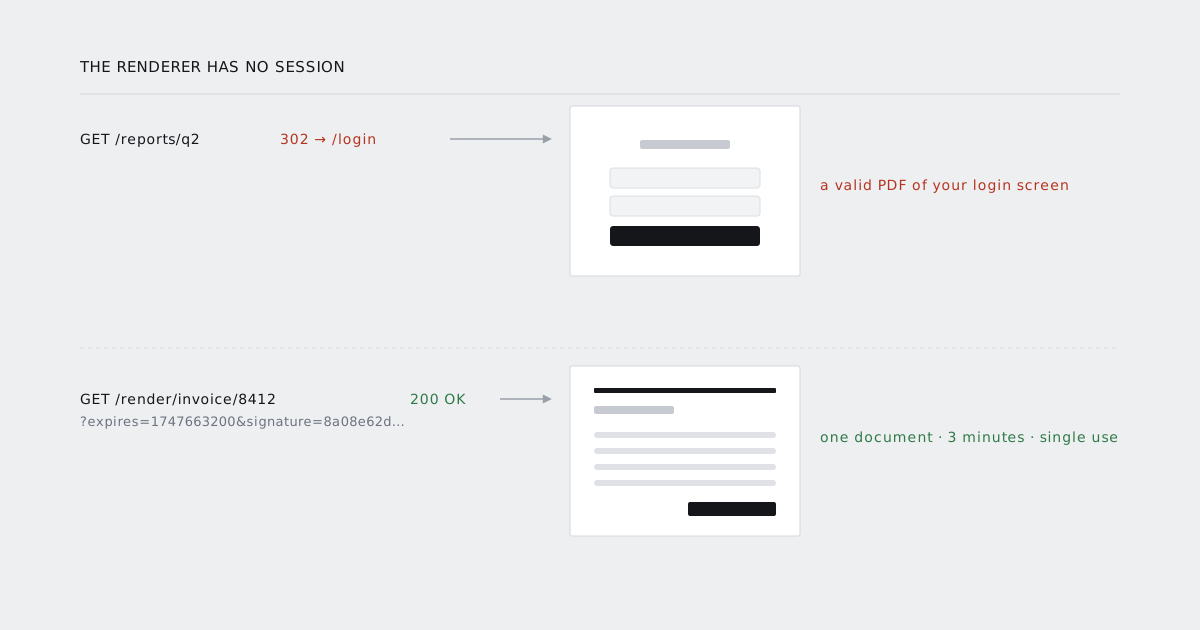
The page you want as a PDF is almost always behind a login. The renderer has no session, so it gets a 302, follows it, and returns a perfectly valid PDF of your login screen.
There are four ways out of that. One is right most of the time, two are defensible in specific situations, and one is a staging-only convenience that keeps showing up in production.
1. Signed one-time URLs
Mint a URL that authenticates itself: the document id, an expiry, a nonce, and an HMAC over all three. A route that accepts the signature bypasses session auth entirely.
Route::get('/render/invoice/{invoice}', InvoiceRenderController::class)
    ->middleware('signed')          // no session, no user
    ->name('render.invoice');

$url = URL::temporarySignedRoute(
    'render.invoice',
    now()->addMinutes(3),
    ['invoice' => $invoice->id, 'nonce' => Str::uuid()]
);
const pdf = await client.render({ url, format: "A4", wait_for: "#invoice-total" });
Why this is the default. The credential is scoped to one document, expires in minutes, and grants exactly one capability: read this one page. If it leaks — into a log, a proxy, a screenshot of a support ticket — the blast radius is one invoice that expired three minutes later.
When it is wrong. When the page genuinely needs a user context that the id alone cannot reconstruct: permissions computed from the session, per-user feature flags, a "viewing as" state. You can pass a user id in the signed payload and rehydrate a read-only context from it, but at that point you are building option 3 with extra steps, and you should build option 3 on purpose.
Two details people skip:
- Make it single use. Store the nonce, reject the replay. A three-minute window is short, and it is still a window.
- Do not reuse your public share-link signer. Share links live for weeks. Render links live for minutes. Different secret, different route, different expiry policy.
2. Cookie pass-through
Send the user's session cookie along with the render request.
const pdf = await client.render({
  url: "https://app.acme.com/reports/q2",
  cookies: [{ name: "acme_session", value: req.cookies.acme_session,
              domain: "app.acme.com", secure: true }]
});
Why people reach for it. Zero backend work. The page renders exactly as the user sees it, personalisation and all, because it is the user's session.
Why it is worse than it looks. A session cookie is not a document credential, it is an account credential. You have taken the key to everything that user can do and handed it to a rendering pipeline so it can read one page. Everything downstream — your logs, our logs, a retry, a queued job sitting for eleven minutes — is now holding full account access.
Then the operational problems:
- Sliding expiry. The render request touches the session and extends it, so a user who closed their laptop is silently kept logged in by a background job.
- Rotation. Frameworks that rotate the session id on write will hand the renderer a new id and invalidate the user's own cookie mid-session.
- Audit trails. Your access log now shows that user reading that page from an IP they have never used. Anyone doing security review will ask, and the answer is not reassuring.
- Async. A job that runs twenty minutes later carries a cookie that is twenty minutes old.
When it is defensible. Short-lived synchronous renders of a page whose output depends on session state you cannot reconstruct, in an internal tool, with a session cookie scoped narrowly. If you are rendering customer-facing invoices this way, move to option 1 this quarter.
3. Service tokens
A long-lived bearer token that only your renderer holds. Your middleware accepts it on a narrow route prefix and rehydrates a read-only context for a user id passed in the request.
public function handle(Request $request, Closure $next)
{
    $token = $request->header('X-Render-Token');

    abort_unless(hash_equals(config('render.token'), (string) $token), 403);
    abort_unless($request->routeIs('render.*'), 403);

    Auth::setUser(User::findOrFail($request->integer('as'))->asReadOnly());

    return $next($request);
}
Why it exists. It is the only option that reproduces full user context without handing over a user credential, and it works for async jobs because the token does not expire with a session.
What it actually is. An impersonation endpoint. Treat it like one:
- Scope it to a route prefix that contains nothing but render targets.
- Make the rehydrated context read-only. No writes, no side effects, no "mark as viewed".
- Restrict by source IP if the renderer has stable egress.
- Rotate on a schedule and log every use with the impersonated id. If you cannot answer "who was impersonated last Tuesday", the token is too powerful.
When it is wrong. When one document id would have been enough. Most invoice and report cases are option 1 dressed up.
4. Basic auth
const pdf = await client.render({
  url: "https://staging.acme.com/reports/q2",
  auth: { username: "acme", password: process.env.STAGING_PASSWORD }
});
When it is fine. A staging environment behind a single shared password, where the credential protects nothing except "don't index this".
When it is not. Everywhere else, and for one reason: the credential is not scoped to anything. It is whole-environment access with no expiry, no per-document limit and no audit trail worth the name. It also ends up in URLs, which end up in logs, which end up in places you did not plan for.
If your production app is behind basic auth and that is the only reason this works, you do not have an authentication strategy for rendering. You have a shared password.
Which one
| Scope | Lifetime | Reproduces user context | Safe for async | |
|---|---|---|---|---|
| Signed one-time URL | One document | Minutes | No | Yes |
| Cookie pass-through | Whole account | Session | Yes | No |
| Service token | Route prefix | Until rotated | Yes | Yes |
| Basic auth | Whole environment | Forever | No | Yes |
Start at the top and only move down when the row above genuinely cannot express what the page needs.
Whichever you pick
Assert that you arrived. Every one of these fails by redirecting rather than by erroring. Check the final URL and wait on a selector that only exists on the real page:
const pdf = await client.render({
  url,
  wait_for: "#report-root[data-ready='true']"
});

if (!pdf.final_url.startsWith(expectedPrefix)) {
  throw new Error(`renderer ended up at ${pdf.final_url}`);
}
Log renders separately. A render is not a page view. Mixing them corrupts your analytics and makes the audit conversation harder than it needs to be.
Give the render route its own rate limit. It bypasses your normal auth, so it needs its own ceiling. One document per URL, and a cap per account per minute.
The parameters themselves — cookies, auth, headers, IP allowlisting — are in the security options.